


Release overview
Shipbuilding wants speed
The August 2026 release of SSI ShipConstructor 2027 R2 introduces new capabilities designed to help teams get answers faster, validate design intent earlier, reduce manual work, and reuse proven engineering information across projects.
Leading the release is SSI Assistant, bringing AI-powered access to SSI technical, training and support knowledge directly into the SSI Desktop App. Additional enhancements across ShipConstructor, ShipExplorer and ShipbuildingPLM help streamline work across design, modelling, electrical outfitting, production information, sister-ship projects, and design review.
Table of contents
- SSI Assistant
- PIL Stock Validation + Relative Comparisons
- PartView OSNAPS + Auto Refresh
- Viewable Electrical Entry Points
- BOM Synchronization
- WorkShare PIL Compare and Transfer
- ShipExplorer + ShipbuildingPLM
What’s new this release update
Meet SSI Assistant
Trusted SSI expertise, closer to the work
Too much time can be spent searching manuals, knowledge articles, training content, and other resources when you need help.
SSI Assistant provides AI-powered answers based on SSI technical, training and support knowledge directly through the SSI Desktop App. It draws from ShipConstructor, ShipExplorer, EnterprisePlatform, ShipbuildingPLM, knowledge-base and support articles, SSI Certified Training and other SSI sources.
Ask questions in natural language and get relevant guidance faster without interrupting your workflow to search multiple resources, helping you stay focused on the task at hand.

ShipConstructor is a complete solution for the 3D design, engineering and construction of ships, extending from basic or functional design to detail and production design.
ShipConstructor 2027 R2 helps teams validate design intent earlier, reduce manual steps during detailed modelling and electrical outfitting, maintain BOM revision consistency, and reuse validated engineering information across sister-ship projects.

Enables comparison of model drawing revisions from ShipbuildingPLM, providing a more effective workflow for design review, validation and change analysis.

ShipbuildingPLM is a shipbuilding-specific PLM (product lifecycle management) platform that is the backbone for change control and managing vessel/program data, configuration, approvals, workflows and downstream deliverables.
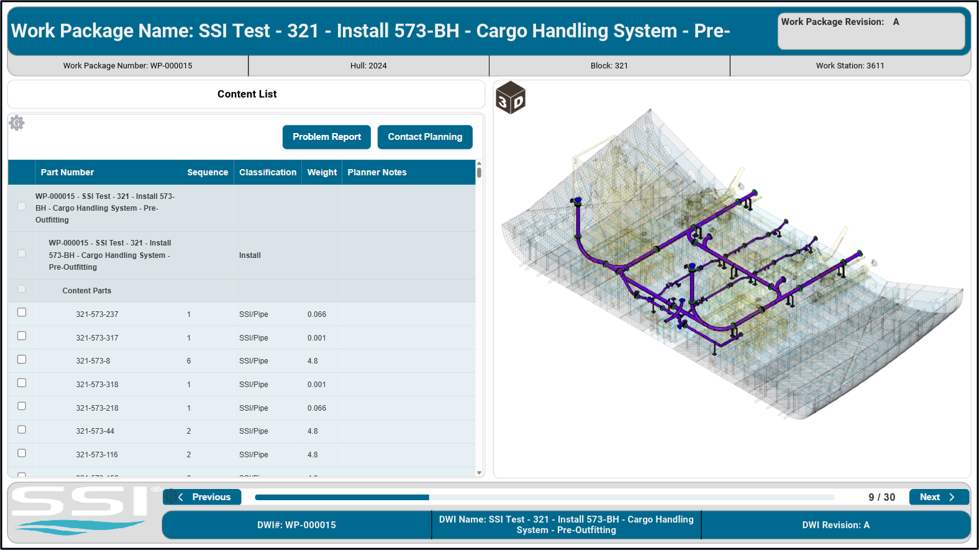
ShipbuildingPLM adds search and filtering within 3D visualization, helping users find and interrogate relevant design information with less navigation.
What’s new for your role
Find the updates most relevant to your work.
Functional designers, systems engineers, and design leads
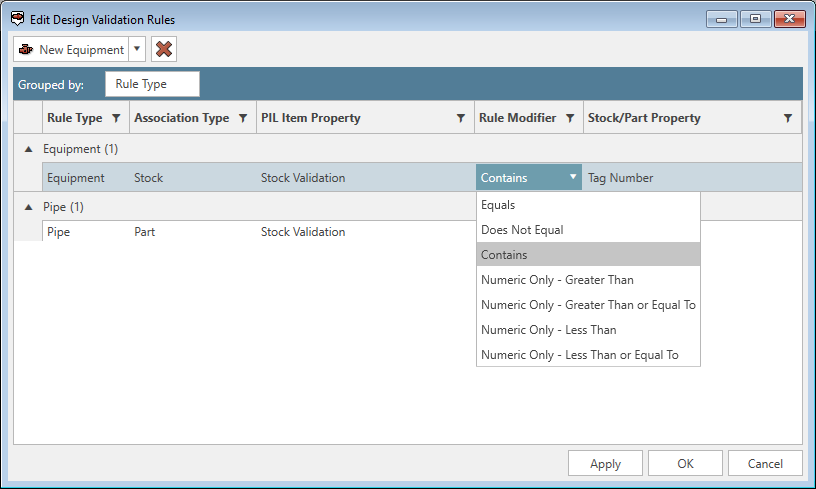
Validate earlier, with more useful results. Compare functional properties against assigned stock before modelling begins and use relative comparisons to support more flexible conditional rules.
Detail designers, modelers, and checkers
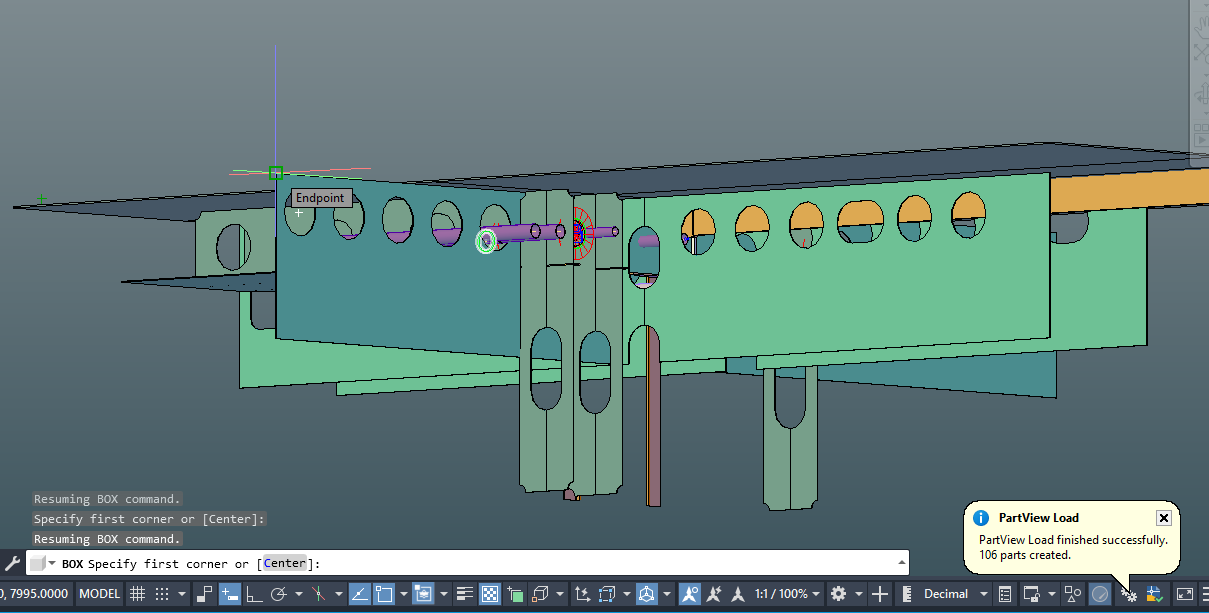
Spend less time on manual modelling steps. Use OSNAPS with PartViews, configure refresh behaviour and receive notification when reference information is outdated. BOM synchronization also helps maintain revision consistency across related drawing layouts.
Outfit modeler
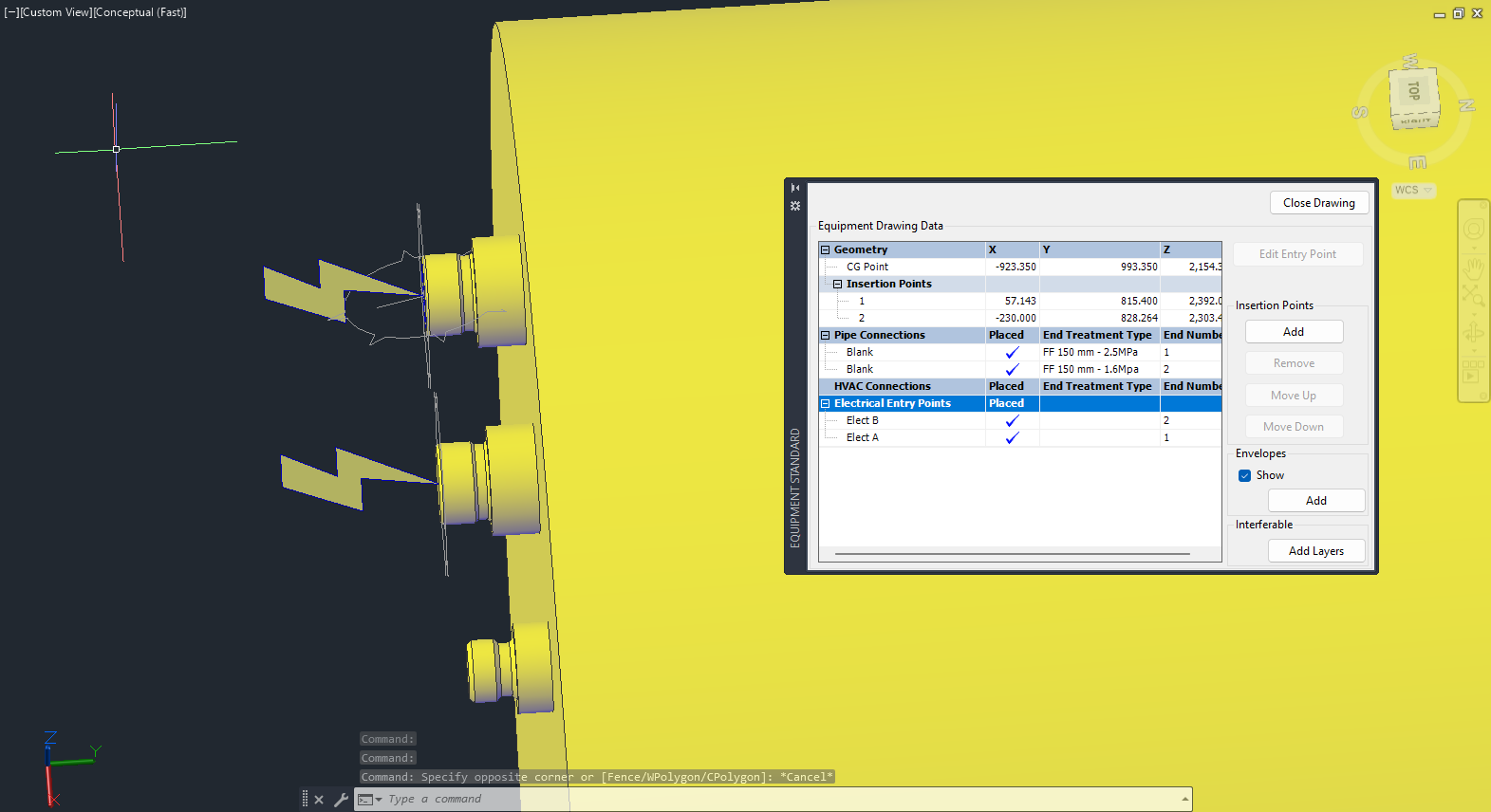
Make equipment connections easier to work with. See electrical entry points directly on equipment and use them as reference locations when positioning space allocations and related objects.
Production drafters and checkers
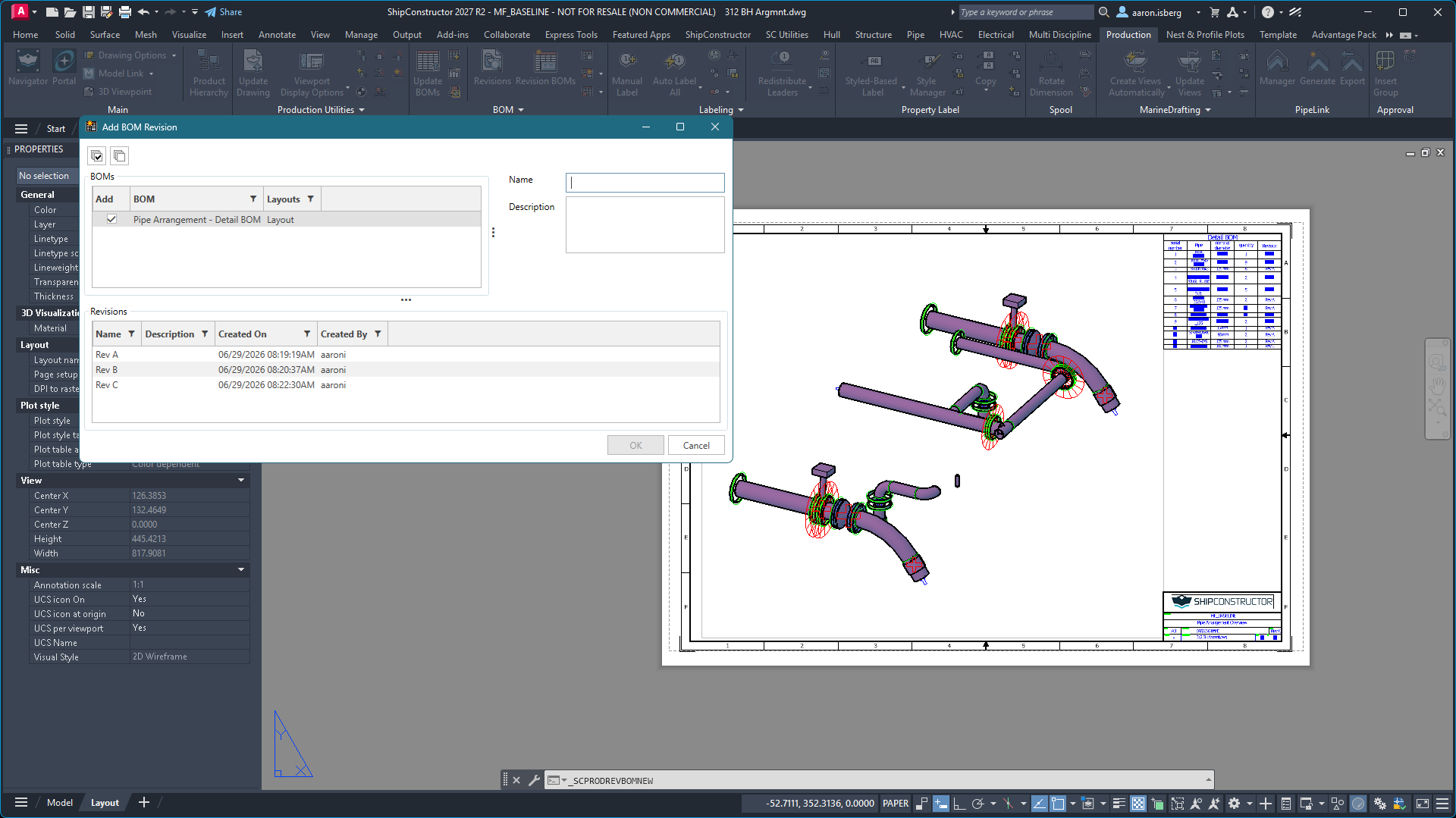
Keep BOM revisions synchronized. Maintain revision consistency across BOMs based on the same definition as drawing layouts change, reducing the need to manage equivalent BOM revision information separately.
Functional engineers and project leads
Get more from proven sister-ship engineering. Transfer and verify PIL associations with transferred parts so validated functional information can be reused between related vessel projects.
Design managers and cognizant engineers
Get to relevant design information faster. Work with grouped ShipbuildingPLM Model Drawings in ShipExplorer and use search and filtering within ShipbuildingPLM 3D visualization to focus your review.
Register for the SSI What’s New Release Webinar
Join the SSI team on August 27 at 8am PT for a first look webinar at the new features and improvements in the August 2026 release.
Register NowDetailed enhancements
Get trusted SSI expertise closer to the work
SSI Assistant
For: SSI users across design, engineering, production and administration.
- Get AI-powered answers based on SSI technical, training and support knowledge.
- Access guidance directly through the SSI Desktop App.
- Spend less time searching across separate SSI resources.
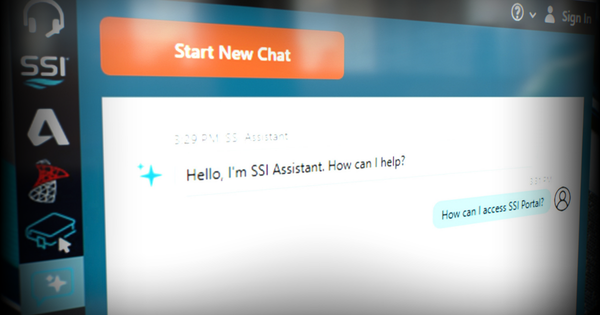
When users need help, finding the right information can mean searching manuals, knowledge articles, training content, and other resources separately.
SSI Assistant brings that information closer to the work by providing AI-powered answers directly through the SSI Desktop App. It draws from ShipConstructor, ShipExplorer, ShipbuildingPLM, knowledge base and support articles, SSI Certified Training and other SSI sources.
Users can get relevant guidance faster without interrupting their workflow to search for multiple resources, helping them stay focused on the task at hand.
Validate design intent earlier and more accurately
PIL Stock Validation + Relative Comparisons
For: Functional designers, detail designers, systems engineers and design leads using the Project Item List.
- Compare functional properties against assigned stock before modelling begins.
- Identify stock and PIL property mismatches earlier.
- Use relative comparisons for conditions beyond simple equals.
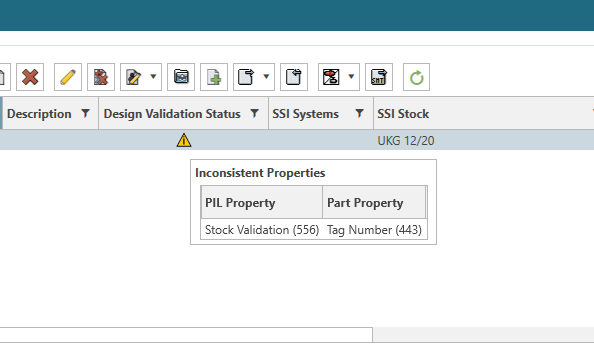
Functional requirements and selected stocks can diverge before the discrepancy becomes obvious. At the same time, exact-match validation can flag acceptable design choices when a selected component legitimately meets or exceeds requirements.
New PIL validation capabilities help address both challenges. PIL Stock Validation runs before modelling and flags mismatches between functional properties and assigned stock, helping teams identify discrepancies before modelling begins.
PIL Relative Comparisons add more flexible conditional rules beyond simple equals. Together, these capabilities help teams catch real mismatches earlier while avoiding false failures when a selected component legitimately meets or exceeds requirements.
Make PartViews more useful in everyday modelling
PartView OSNAPS + Auto Refresh
For: ShipConstructor detail designers and CAD users.
- Use OSNAPS with PartViews for common measurement and positioning workflows.
- Configure PartView refresh behavior.
- Receive notification when reference information is outdated.
Working with PartViews can require extra references or manual refresh steps, adding time to everyday modelling and creating uncertainty about whether reference information is current.
PartViews now support OSNAPS, allowing designers to use standard snapping workflows for common measurement and positioning tasks.
Configurable Auto Refresh behavior can also update PartViews on load and notify users when they are out of date. Together, these enhancements help designers use familiar modelling workflows while maintaining greater confidence that referenced information is current.
Make electrical equipment connections easier to see and use
Viewable Electrical Entry Points
For: Electrical and outfitting designers.
- See electrical entry points directly on equipment.
- Use entry points as reference locations in the model.
- Snap space allocations to the intended equipment connection point.
Positioning objects relative to equipment connections can require designers to manually determine coordinate locations.
With ShipConstructor 2027 R2, electrical entry points are visible on equipment and available as usable reference locations in the model. Designers can snap space allocations to visible equipment entry points instead of manually defining their coordinate location.
This reduces manual setup and supports faster, clearer placement of space allocations and related objects.
Keep production drawings easier to maintain
BOM Synchronization
For: Detail designers, production drawing teams and engineering leads.
- Keep BOMs based on the same definition synchronized as drawing revisions change.
- Reduce manual management of equivalent BOM revision information across sheets.
- Maintain greater consistency as drawing packages evolve.
Drawing packages change continually during detailed design. When BOMs are added or moved across drawing layouts, maintaining revision information manually can create additional work and inconsistencies.
With BOM synchronization, revisions are applied to all BOMs using the same definition across layouts in the drawing. Teams can evolve drawing packages without separately maintaining equivalent BOM revision information across sheets.
This reduces manual updating and helps maintain more reliable production documentation as drawings change.
Turn proven sister-ship engineering into reusable project knowledge
WorkShare PIL Compare and Transfer
For: Engineering teams, project leads and designers working on sister ships or vessel classes.
- Transfer and verify PIL associations together with transferred parts.
- Reuse validated functional engineering inputs between projects.
- Make related vessel projects easier to create, compare and verify.
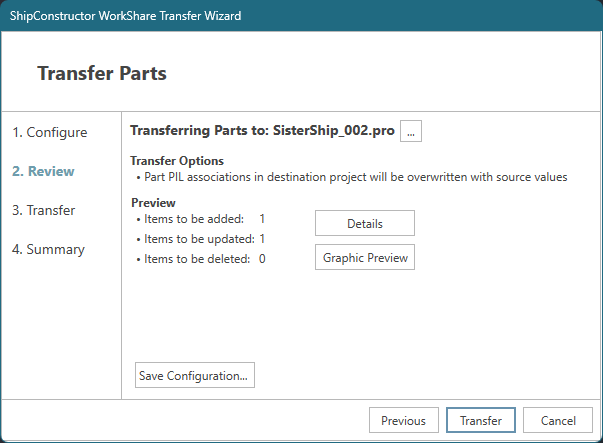
Related vessel projects may require teams to recreate or manually reconcile functional inputs and model associations, repeating engineering work across vessels of the same class.
WorkShare PIL Compare and Transfer allows PIL associations to be transferred and verified together with transferred parts. This allows proven functional information to move between projects rather than requiring teams to reconstruct the same functional relationships project by project.
Teams can build on verified project information, supporting faster project setup, easier comparison, and greater reuse of validated engineering information, particularly across projects of the same class.
Make connected design information easier to find, group, and review
ShipExplorer + ShipbuildingPLM
For: Design reviewers, project leads, ShipExplorer users and ShipbuildingPLM users.
- Work with grouped ShipbuildingPLM Model Drawings in ShipExplorer.
- Search and filter within ShipbuildingPLM 3D visualization.
- Reach relevant design information with less navigation.
Large, connected product models contain substantial information, which can make it difficult to isolate the content relevant to a specific review. Users may need to navigate design information item by item or manually isolate relevant content from complex 3D models.
ShipExplorer can now consume grouped ShipbuildingPLM Model Drawings, while ShipbuildingPLM adds search and filtering within 3D visualization.
Together, these capabilities make connected design information easier to find, group, and review. Users can reach the information relevant to a review more quickly and interrogate it with less navigation overhead.
Register for the SSI What’s New Release Webinar
Register for the webinar below to watch it live or recorded and see the new features and improvements in action.
Webinar Date: August 27, 2026, at 8am PT

Shape the next SSI release
Take our quick survey to help us understand how you use SSI products.
System Requirements
| Supported Client Operating Systems | Windows 11 |
| Supported Server Operating Systems | Windows Server 2025, 2022 |
| .Net Framework | .NET 10 (installed automatically) |
| SQL Servers | MS SQL Server 2022 CU 4+, 2019. SQL Server 2022 Express is included with the installer. Note: Express editions are suitable for projects with 5 or fewer users only. SQL Enterprise 2019+ for WorkShare Teams |
| Supported AutoCAD Platforms | 2027 AutoCAD, AutoCAD Mechanical, AutoCAD Plant3D (for ShipConstructor P&ID Design Validation functionality of Pipe) |
| Supported Navisworks Versions | 2027 Navisworks Simulate, Navisworks Manage |
| Side-by-side Installation Compatibility | ShipConstructor 2027 can be installed side-by-side with any previous major ShipConstructor version; each installed version of ShipConstructor requires its own dedicated instance of AutoCAD. |
| Supported Aras Innovator Versions | Aras Innovator 38 |
SSI Installation Guide
Access the latest ShipConstructor manual on SSI Nexus for detailed installation instructions and system requirements for this release.
Download Information
To download this release, visit the downloads section of SSI Nexus. There, you can get access to all the latest SSI releases.
Purchasing Information
For information on this release, to purchase the software, or to renew your Subscription contact an SSI Representative.