


Release overview
Confidence from design to production
The November 2026 release of SSI ShipConstructor 2027 R3 introduces new capabilities to help shipbuilders work with greater confidence, from detailed design through production preparation.
Leading the release are the new PIL Designer Palette and PIL Properties Palette, which bring functional engineering information directly into the design environment. Additional enhancements provide more flexible control over design changes, extend established penetration workflows to curved plates, and help maintain accurate production information.
With improvements for designers, engineers, production teams, and administrators, this release makes it easier to access the right information, reduce manual work, and keep engineering data aligned throughout the shipbuilding process.
Table of contents
- Bring functional information directly into the designer’s workflow
- Validate functional requirements where design decisions happen
- More flexible access without additional administration
- Extend consistent penetration workflows to curved plates
- Protect product structures from incorrect assignments
- Support newer Microsoft SQL Server environments
What’s new this release update
PIL Designer Palette
Bring functional design information directly into the designer’s workflow
Managing functional requirements separately from detailed modelling makes it harder to identify missing components, maintain associations and verify that systems are complete.
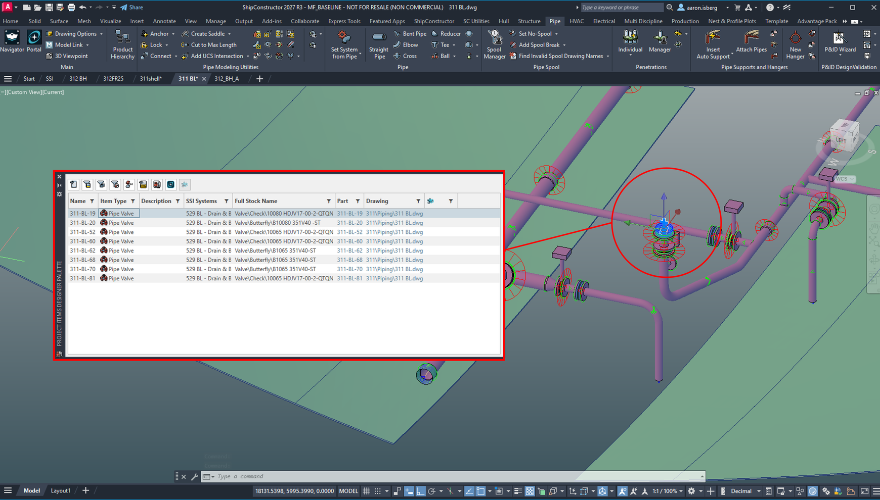
The new PIL Designer Palette brings Project Item List information directly into the design environment. A compact grid displays relevant items based on criteria you can customise, making it easier to see which items are defined and which still need attention.
Create PIL items, link them to modelled parts and move between functional information and the 3D model. This reduces manual checks and helps keep the detailed design aligned with engineering requirements.

ShipConstructor is a complete solution for the 3D design, engineering and construction of ships, extending from basic or functional design to detail and production design.

Enables comparison of model drawing revisions from ShipbuildingPLM, providing a more effective workflow for design review, validation and change analysis.

ShipbuildingPLM is a shipbuilding-specific PLM (product lifecycle management) platform that is the backbone for change control and managing vessel/program data, configuration, approvals, workflows and downstream deliverables.
What’s new for your role
Find the updates that matter most to your work.
Whether you’re modeling ship systems, managing engineering changes or preparing information for production, see how the latest ShipConstructor enhancements support your responsibilities.
Outfitting and detail designers
Keep functional and detailed design connected. Manage functional items, identify missing elements, and review associated properties directly alongside your modelling work, reducing manual checks, and helping you complete systems with greater confidence.
Systems engineers and discipline leads
Spot inconsistencies before they become bigger problems. Review functional requirements alongside detailed design information and compare properties across selected parts to identify differences more easily.
Configuration managers and engineering leads
Manage design access without creating more roles. Grant locking permissions directly to individual users, reducing administration while maintaining control over who can make engineering changes.
Structural designers and penetration coordinators
Use familiar penetration workflows for curved plates. Create and manage curved plate penetrations using established tools, with cutout and marking information automatically reflected in production geometry.
Production designers and engineering leads
Reduce errors when managing product structures. Hide PartViews in the BOM Part Viewer to focus on physical parts and reduce the risk of incorrect Product Hierarchy assignments.
IT and ShipConstructor administrators
More flexibility for database deployments. Plan new installations and upgrades with support for Microsoft SQL Server 2025, including SQL Server 2025 Express in the ShipConstructor installer.

Register for the SSI What’s New Release Webinar
Join the SSI team on December 10, 2026, at 8 a.m. UTC-8 (Pacific Standard Time) to explore the new features and improvements in ShipConstructor 2027 R3.
See how the latest updates help designers, engineers, and production teams validate design intent, manage engineering changes, and prepare accurate information for production.
Register NowDetailed enhancements
Bring functional information directly into the designer’s workflow
PIL Designer Palette
For: Outfitting designers, systems engineers and detail designers.
- View functional Project Item List objects within the design environment.
- Identify missing or undefined items and create associations.
- Navigate between functional information and the 3D model.
Managing functional requirements separately from detailed modelling makes it harder to identify missing components, maintain associations, and verify system completeness.
The new PIL Designer Palette brings Project Item List information directly into the designer’s workflow. A compact grid displays relevant items using customizable criteria, making it easier to identify defined and undefined elements.
Designers can create PIL items, establish associations, and navigate between functional information and modelled parts without relying on disconnected views and manual checks.
The result is simpler functional item management, less administrative effort, and stronger alignment between engineering requirements and detailed design.
Validate functional requirements where design decisions happen
PIL Properties Palette
For: Detail designers, systems engineers, discipline leads and engineering managers.
- Review functional properties associated with selected modelled parts.
- Compare PIL attributes across multiple selected parts.
- Identify differences in functional properties and user-defined attributes.
Checking whether detailed designs reflect functional requirements can involve manually gathering and comparing information from different sources.
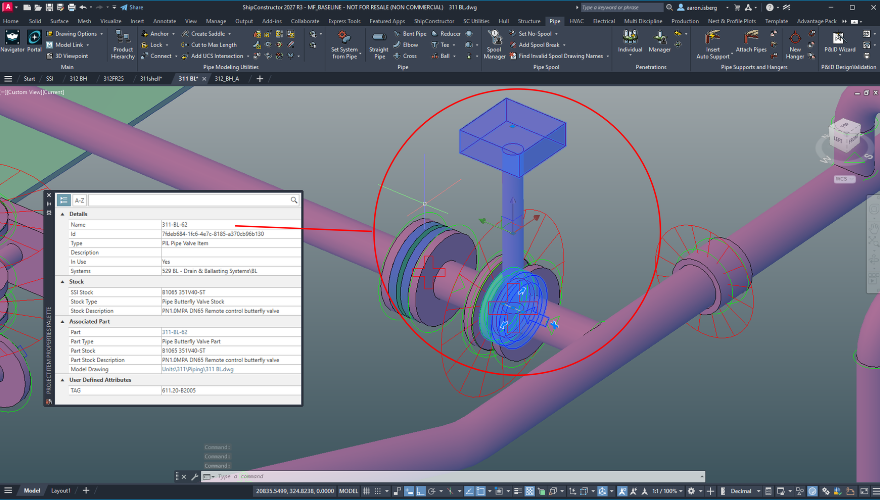
The new PIL Properties Palette makes associated functional properties accessible directly within the design environment.
When multiple parts are selected, the palette displays shared property values and uses a VARIES indicator to highlight differences. This helps engineers identify inconsistencies, simplify design reviews, and validate that modelled parts align with functional requirements.
More flexible access without additional administration
Individual Locking Permissions
For: Configuration managers, PLM administrators, discipline leads, document controllers, and production engineering leads.
- Grant locking permissions directly to individual users.
- Avoid creating or modifying roles for individual access requirements.
- Maintain controlled access to engineering information.
Managing design locks through user roles can create unnecessary administration when specific individuals need additional permissions.
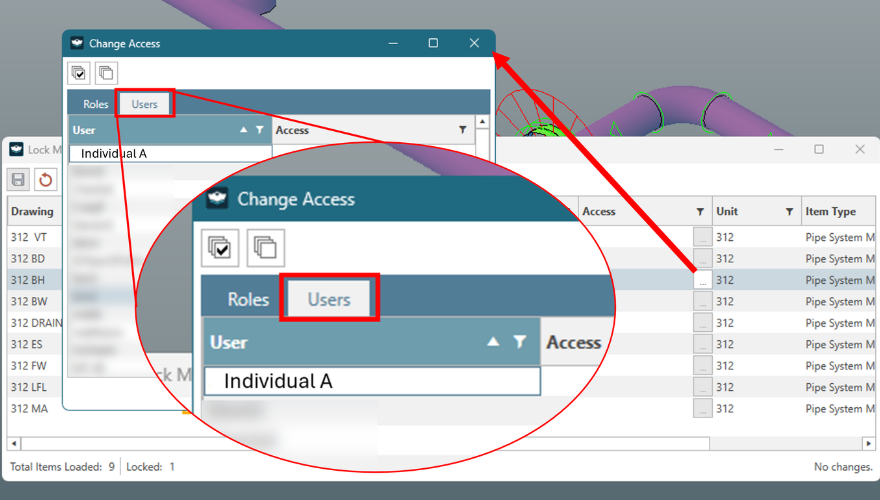
Individual Locking Permissions introduces a new Users tab in the Change Access dialog, allowing managers to grant lock access directly to specific people.
The enhancement works within ShipConstructor’s existing Lock Manager framework, which supports drawings, assemblies, parts, spools and nests.
Teams can manage permissions according to individual project responsibilities while maintaining control over engineering changes.
Extend consistent penetration workflows to curved plates
Curved Plate Penetrations
For: Structural designers, piping and HVAC modelers, penetration coordinators and production design teams.
- Create and manage penetrations through curved plates using established workflows.
- Automatically update production geometry with penetration cutouts.
- Carry Penetrable Mark Text information into curved plate production data.
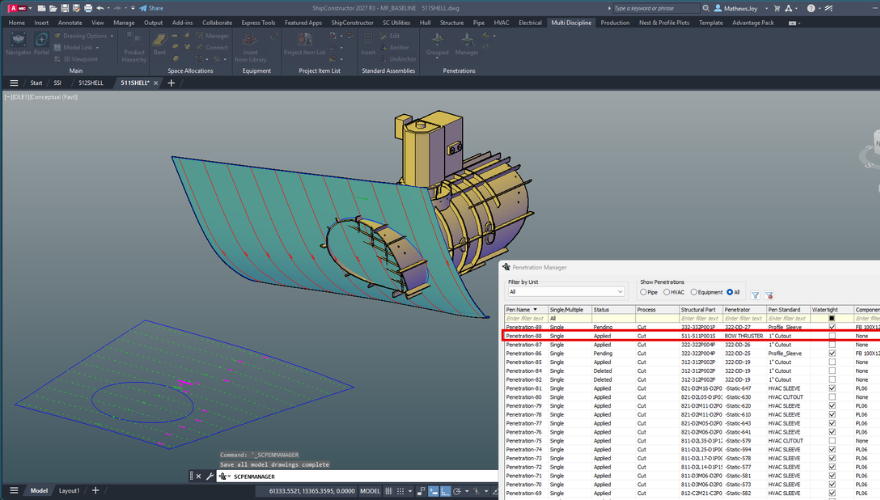
Curved plates are now supported by ShipConstructor’s standard penetration workflow, allowing designers to create and update penetrations using the same tools and standards available for plates, corrugated plates and profiles.
Penetration cutouts and marking information are automatically reflected in curved plate production geometry.
This reduces the need to manage curved plate penetrations separately, supporting more consistent coordination between disciplines and more reliable production information.
Protect product structures from incorrect assignments
BOM Part Viewer Enhancements
For: Production designers, detail designers, production engineering leads and engineering managers.
- Show or hide PartViews in the BOM Part Viewer.
- Focus on relevant physical parts during assignment workflows.
- Reduce the risk of incorrect Product Hierarchy changes.
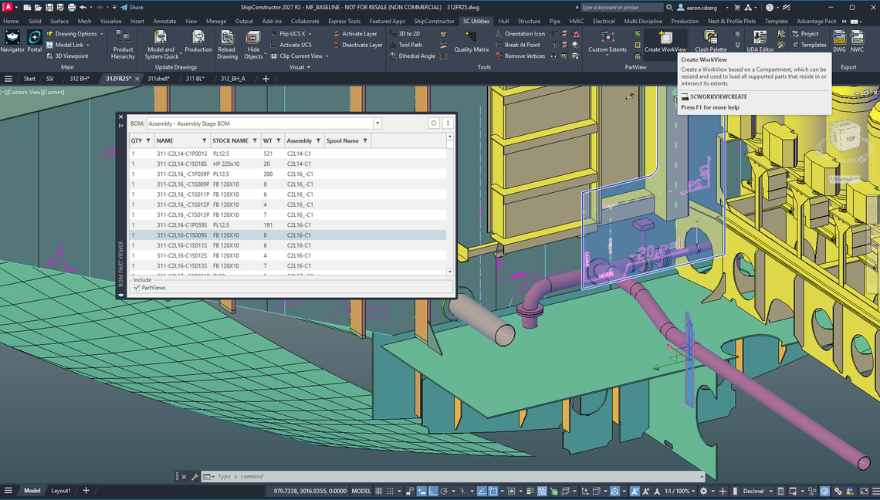
When PartViews appear alongside physical design parts in the BOM Part Viewer, they can be accidentally selected during part assignment workflows, potentially resulting in unintended changes to the primary Product Hierarchy.
A new PartViews visibility checkbox allows users to show or hide PartViews when reviewing and managing part assignments.
By filtering out PartViews when they aren’t needed, teams can simplify BOM reviews, reduce assignment errors, and maintain greater confidence in the accuracy of their product structures.
Support newer Microsoft SQL Server environments
SQL Server 2025 Support
For: ShipConstructor administrators, IT managers, database administrators and engineering systems managers.
- Support Microsoft SQL Server 2025 alongside SQL Server 2022 CU4+.
- Access SQL Server 2025 Express through the ShipConstructor installer.
- Align deployments with newer supported database infrastructure.
ShipConstructor 2027 R3 introduces support for Microsoft SQL Server 2025, providing more flexibility for organizations planning software upgrades or new project deployments.
Microsoft SQL Server 2025 Express is also included with the installer.
These updates help IT and engineering systems teams align ShipConstructor installations with their organization’s database infrastructure plans.
Register for the SSI What’s New Release Webinar
Register for the webinar below to watch it live or recorded and see the new features and improvements in action.
Webinar Date: 8 a.m. UTC-8 (Pacific Standard Time)

System Requirements
| Supported Client Operating Systems | Windows 11 |
| Supported Server Operating Systems | Windows Server 2025, 2022 |
| .Net Framework | .NET 10 (installed automatically) |
| SQL Server | Microsoft SQL Server 2025 and SQL Server 2022 CU4+ |
| Supported AutoCAD Platforms | AutoCAD 2027, AutoCAD Mechanical 2027, AutoCAD Plant 3D 2027 |
| Supported Navisworks Versions | Navisworks Simulate 2027, Navisworks Manage 2027 (exporter downloaded separately) |
| Supported Aras Innovator Versions | Aras Innovator Release 38 |
SSI Installation Guide
Access the latest ShipConstructor manual on SSI Nexus for detailed installation instructions and system requirements for this release.
Download Information
To download this release, visit the downloads section of SSI Nexus. There, you can get access to all the latest SSI releases.
Purchasing Information
For information on this release, to purchase the software, or to renew your Subscription contact an SSI Representative.